

What changes and what does not
Only the display label changes. The pillar keeps its URL, its consoles, its member grants, and every link anyone has bookmarked. Renaming Planning to “Forecasting” changes the word in the header and nowhere else. The Revenue Control Tower and Finance cannot be renamed. The Revenue Control Tower is the landing surface every member shares rather than a pillar of its own, and Finance is not yet on the pillar switcher. A rename takes effect immediately for everyone in the organization. There is no approval step.Rename from the form
1
Open the form
In the chat composer, type
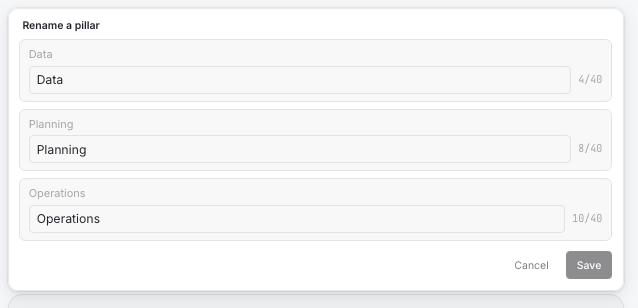
/rename and press Enter. A card opens with one field per renameable pillar, pre-filled with the current label.2
Edit the labels
Change one or more labels. Each field shows a character count and accepts 2 to 40 characters. Save stays disabled until you change something.
3
Save
Click Save. A receipt appears in the conversation listing each change, for example “Renamed the Planning pillar to “Forecasting"", and the header updates at once.
Rename by asking
You can ask for the same change in plain language. The assistant applies the same rules as the form and reports the result.- “Rename the Operations pillar to GTM.”
- “Call Data ‘Data Foundation’.”
- “Reset Planning to its default name.”
Rules
- A label is 2 to 40 characters. Leading and trailing spaces are trimmed.
- No two pillars in one organization can share a label, ignoring case. Renaming Planning to “Finance” is refused because Finance already uses that name.
- Setting a label back to the product default is treated as a reset, so the custom label is dropped rather than stored.
- Resetting a pillar that already uses its default name is reported as no change.