> ## Documentation Index
> Fetch the complete documentation index at: https://docs.syntaxia.com/llms.txt
> Use this file to discover all available pages before exploring further.
# Ask SyntaxIA
> Ask questions about your CRM data and change workspace settings from the in-product chat.
Ask SyntaxIA is the chat assistant built into the Syntaxia app. You can ask it operational questions about your reconciled CRM data, and, depending on your access, use it to change a few workspace settings without leaving the page you are on.
## Open the chat
There are three ways to reach the same conversations.
* **The header button.** Click **Ask SyntaxIA** in the app header to open a chat window docked at the bottom of the page. The window follows you as you move between pages.
* **The Desk.** Click the expand icon in a chat window to open the conversation as a full page. The Desk lists all of your conversations in a rail on the left.
* **Suggested questions.** A new conversation shows starter chips that match the pillar you are in, such as "How fresh is my data?" or "Summarize my pipeline". Click one to send it.
Your organization needs an active [AI provider](/guide/ai-providers) before the chat can answer. Without one, the composer shows a provider gate instead of a text box.
## What you can ask
The assistant answers questions about what happened in your CRM data: counts, lists, stage history, sync freshness, duplicates, and similar operational facts. Every answer is grounded in a retrieval call against your organization's data, and the citations panel shows which records it read.
It refuses four kinds of request by design:
* Forecasting or predictive scoring, such as "which deals will close this quarter".
* Write actions on CRM records, such as creating, updating, or deleting an account.
* Comparisons with other organizations or industry benchmarks.
* Coaching, advice, or strategy narrative.
The settings changes described below are the exception to the write rule. They change how your Syntaxia workspace is configured, never a CRM record, and each one is gated by your access.
## Slash commands
Type `/` in the composer to open the command menu. The menu only lists commands you are allowed to run.
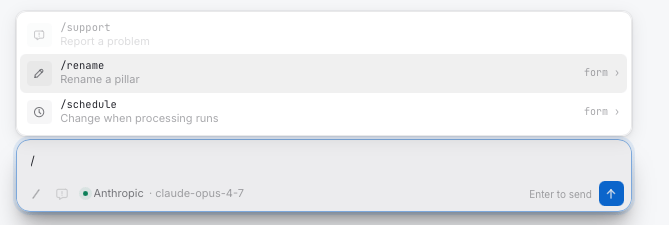 | Command | What it does | Who sees it |
| ----------- | ------------------------------------------------------------------------------------------------------------------- | ------------------------------------------------------ |
| `/support` | Opens the **Report a problem** form. See [Report a problem](/guide/chat/report-a-problem). | Everyone, once reporting is enabled for the workspace. |
| `/rename` | Opens a form to rename the Data, Planning, or Operations pillar. See [Rename a pillar](/guide/chat/rename-pillars). | Owners and admins who hold the Data pillar. |
| `/schedule` | Opens a form to change when data processing runs. See [Processing schedule](/guide/chat/processing-schedule). | Owners and admins who hold the Data pillar. |
`/rename` and `/schedule` open a guided form inside the chat. You can also ask for the same change in plain language, for example "Rename Planning to Forecasting" or "Run processing at 6am Europe/London on weekdays". Both routes apply the same rules and write a receipt into the conversation.
The industry classification policy has no slash command. You read and change it by asking. See [Industry classification](/guide/chat/industry-classification).
## Who can do what
Access to the settings verbs depends on two things: your organization role and whether you hold the **Data** pillar. Pillars are granted per member in **Settings** > **Team**, or through a join code that carries them.
| Action | Any member | Member with Data pillar | Owner or admin with Data pillar |
| ----------------------------------------- | ---------- | ----------------------- | ------------------------------- |
| Ask questions about CRM data | Yes | Yes | Yes |
| Report a problem | Yes | Yes | Yes |
| Read the processing schedule | Yes | Yes | Yes |
| Read the industry classification policy | Yes | Yes | Yes |
| Change the industry classification policy | No | Yes | Yes |
| Rename a pillar | No | No | Yes |
| Change the processing schedule | No | No | Yes |
When you ask for a change you are not allowed to make, the assistant tells you who can make it and does not attempt it. An owner or admin without the Data pillar cannot rename pillars or change the schedule either, because Data is the pillar that owns workspace configuration.
Access is resolved on the server for every message. The assistant is never handed a verb it cannot run, so a permission cannot be talked into existence from the conversation.
## Conversation scope
A conversation opened from a Vantage report or a [mapping review](/guide/golden-layer#review-a-source-with-the-agent) is scoped to that subject. The settings verbs are still available from a Vantage conversation, but a mapping review hides them, because that thread is about one source's columns and nothing else.
| Command | What it does | Who sees it |
| ----------- | ------------------------------------------------------------------------------------------------------------------- | ------------------------------------------------------ |
| `/support` | Opens the **Report a problem** form. See [Report a problem](/guide/chat/report-a-problem). | Everyone, once reporting is enabled for the workspace. |
| `/rename` | Opens a form to rename the Data, Planning, or Operations pillar. See [Rename a pillar](/guide/chat/rename-pillars). | Owners and admins who hold the Data pillar. |
| `/schedule` | Opens a form to change when data processing runs. See [Processing schedule](/guide/chat/processing-schedule). | Owners and admins who hold the Data pillar. |
`/rename` and `/schedule` open a guided form inside the chat. You can also ask for the same change in plain language, for example "Rename Planning to Forecasting" or "Run processing at 6am Europe/London on weekdays". Both routes apply the same rules and write a receipt into the conversation.
The industry classification policy has no slash command. You read and change it by asking. See [Industry classification](/guide/chat/industry-classification).
## Who can do what
Access to the settings verbs depends on two things: your organization role and whether you hold the **Data** pillar. Pillars are granted per member in **Settings** > **Team**, or through a join code that carries them.
| Action | Any member | Member with Data pillar | Owner or admin with Data pillar |
| ----------------------------------------- | ---------- | ----------------------- | ------------------------------- |
| Ask questions about CRM data | Yes | Yes | Yes |
| Report a problem | Yes | Yes | Yes |
| Read the processing schedule | Yes | Yes | Yes |
| Read the industry classification policy | Yes | Yes | Yes |
| Change the industry classification policy | No | Yes | Yes |
| Rename a pillar | No | No | Yes |
| Change the processing schedule | No | No | Yes |
When you ask for a change you are not allowed to make, the assistant tells you who can make it and does not attempt it. An owner or admin without the Data pillar cannot rename pillars or change the schedule either, because Data is the pillar that owns workspace configuration.
Access is resolved on the server for every message. The assistant is never handed a verb it cannot run, so a permission cannot be talked into existence from the conversation.
## Conversation scope
A conversation opened from a Vantage report or a [mapping review](/guide/golden-layer#review-a-source-with-the-agent) is scoped to that subject. The settings verbs are still available from a Vantage conversation, but a mapping review hides them, because that thread is about one source's columns and nothing else.